Corporate & Business Development
1- Summary Flow
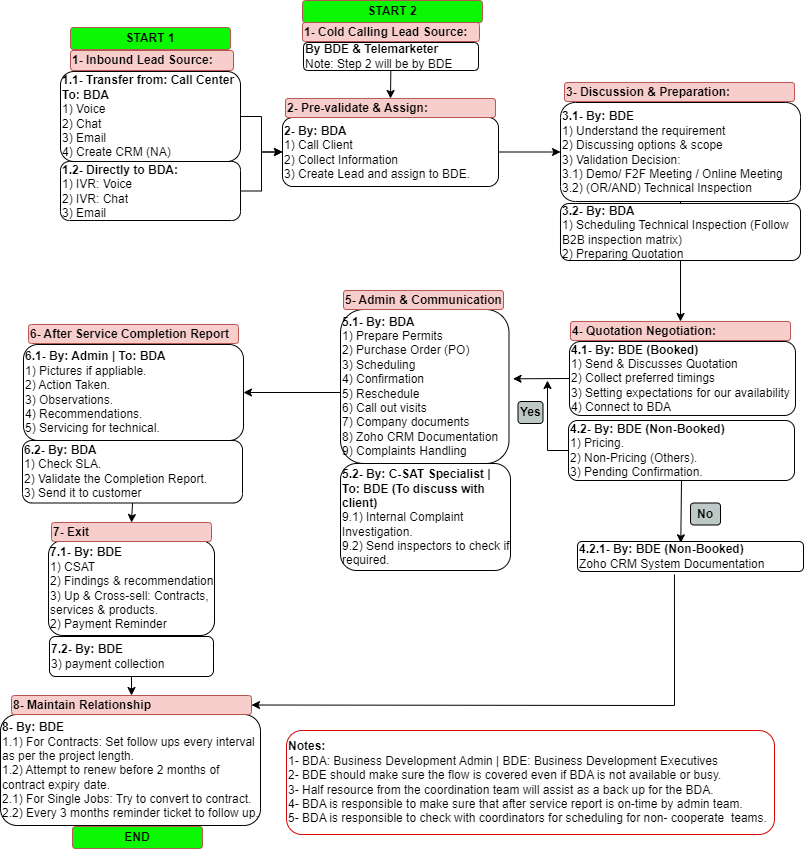
2- General Work Flow
3- Contract Workflow
4- Zuper
5- Video Links
6- Corporate complaints process
1- Summary Flow
For the New Corporate Lead Qualification & Handling ProcessClick Here for the Material or Click here for PDF
Summary of Work Flow
Summary of Work Flow
| Sr. | Action | Action Owner | How to Do It? | What Is the Action if It Is Not Followed Properly? | Action Owner (Follow-up) |
|---|---|---|---|---|---|
| 1 | Blocking Slots | BDA | Step 1: Block the required slot. Step 2: Raise an FYI ticket for the coordination team including who was blocked, date, time, duration, and customer #. Step 3: Update the blocking with: – Date of blocking – Time of blocking – Blocker Name – Customer Number – Special Notes – Ticket Number Example, if blocking is less than 48 hours from the current day: If a block is created on 24/10/2025 at 3 PM for 27/10/2025 at 2 PM, it will be deleted automatically by 25/10/2025 at 3 PM if there is no special note from coordinators. Example, if blocking is more than 48 hours from the current day: If a block is created on 24/10/2025 at 3 PM for 10/11/2025 at 2 PM, it will be deleted automatically before 48 hours of the booking date by 08/10/2025 at 3 PM. Guidelines: Normal blockings, if placed correctly and not used, will be removed as per the examples. Special notes, where applicable as per the examples: the Coordinator should call the BDA, who should communicate with the BDE that a residential client has confirmed a job that needs to be placed. The BDE must reply the same day to coordinators ASAP. If the BDE refuses to remove the blocking causing wastage, the coordinator will inform the call center supervisor/manager to check with the BD Manager. A picture of the blocking with the special note should be uploaded inside the ticket for trackability in case it is deleted without discussion between coordination and BDA. | Blocking will be removed once spotted by coordinators. | Coordination Team |
| 2 | Finding Availability for Booking Directly | BDA | You can book directly while considering the following recommendations: 1. Utilize the corporate field team if applicable. 2. Check field resourcing directly with the operation supervisor/division manager. 3. Book empty slots of residential or consider moving residential clients to empty a slot. In both scenarios, send an FYI ticket to coordinators with: • Job # moved from date & time TO date & time • Booked Job # under which TL, date, and time Include notes in Zuper Notes for reference. | A commercial job will be placed as unassigned if any issue is identified with residential clients being unassigned or if it may lead to a potential complaint. The BDA will be notified accordingly. If the corporate team is not utilized properly, the coordinator will utilize the team accordingly by moving corporate jobs at the same time and date under the corporate team. | Coordination Supervisor / Captain |
| 3 | Job Extension | BDA | If a job extension affects other jobs, the BDA is responsible for managing affected residential jobs. Try with the BD client first. If not manageable, consider moving residential clients to empty a slot. For this option, send an FYI ticket to coordinators with: • Job # moved from date & time TO date & time Include notes in Zuper Notes for reference. | A commercial job will be placed as unassigned if any issue is identified with residential clients being unassigned or if it may lead to a potential complaint. The BDA will be notified accordingly. | Coordination Supervisor / Captain |
| 4 | Escalation of an Issue | BDA | First Level: Direct Manager – Humphry (0525041518) Second Level: Coordination Supervisor – Jetlee (0558801335) OR Coordination Captain – Deepak (0504159220) Third Level: Youssef (Coordination Lead – 0508657185) | – | – |
| 5 | Change in Team Resourcing after Pass/Permit Issued | BDA & Coordination | Whoever receives the update should handle it immediately. | – | – |
| 6 | Sunday Communications | BDA | The action must be taken at the end of Saturday for Monday’s blocking. | Expect removal of Monday blockings by coordinators if not followed. | Coordination Team |
| 7 | Handling MS Manpower | BDA | – To be discussed internally with direct manager first. – To discuss with MS Supervisor directly if needed. | – | – |
| 8 | Job Cancellations | BDA | Notify the relevant team via the WhatsApp group with reason of cancellation. | – | – |
| 9 | BD Job Confirmation | BDA | The stage in Zuper should always be Pass/Permit. If still under “New” or “Confirmed,” it is not safe to proceed. | Possibility of job cancellation. | – |
2- General Work Flow
3- Contract Workflow
General KPIs
1- In case the schedule job got canceled or client didn't confirm, BDA responsible to reschedule it again.
2- In case if there is more than one visit not paid in the system (CF), BDA should alert BDE for collection.
3- Professionalism: Following standard templates for email communication with clients
4- Booking on the system should match the contract (Duration, pricing as well description should be correct.
4- Zuper
Zuper Manual
Click Here To Access
5- Video Links
Video Links:
Click Here To Access
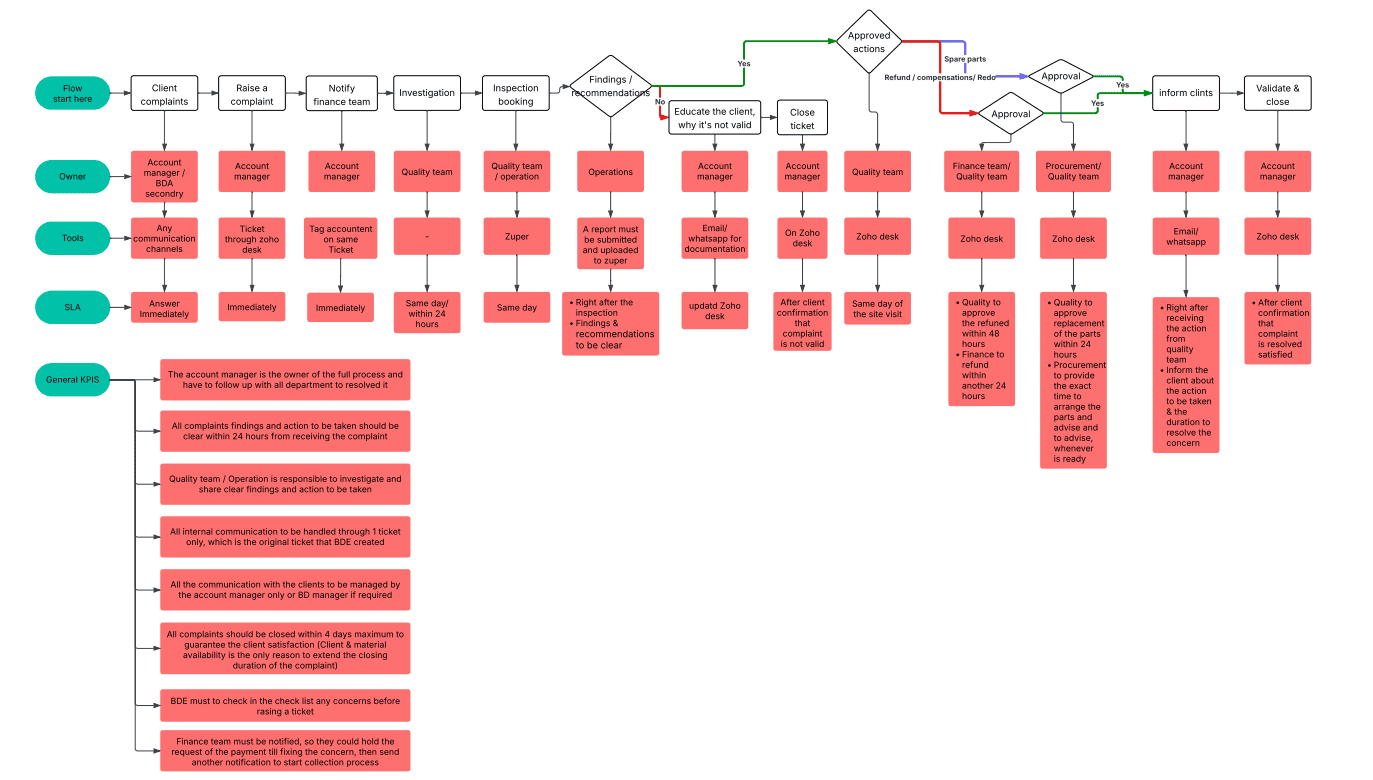
6- Corporate complaints process